Sansad Showdown: The Great Kursi Fight is a browser fighting game hosted at FightKaro. Pick a caricature fighter, face the computer or open a room for a friend, and learn to move, defend and attack. The game describes itself as political satire and parody; its characters and fictional presentation should not be treated as political reporting. This independent guide is not affiliated with its creator.
The steps below describe the public page checked on November 7, 2026. Browser games can change without a conventional patch notice, so read the current instructions on the game screen if a button or menu looks different. The game is separate from a parliamentary strategy title that uses the same name elsewhere.
Start a match
- Open the game at FightKaro in a current desktop or mobile browser. Read its satire notice, then use Enter, click, or tap when prompted.
- On the selection screen, choose your fighter and a CPU opponent. The page also provides a random option if you want to experiment.
- Pick a stage and difficulty. The selection interface lists Sansad, Jantar Mantar and Desi Sadak, along with Easy, Normal and Hard for a CPU match.
- Start the fight with the displayed Fight control or Enter. Keep the game tab focused so keyboard input reaches it.
- Watch the two health bars, the timer and the SHAKTI meter. Learn one action at a time before trying longer combinations.
On a keyboard, the selection legend lists left and right for the player choice, up and down for the CPU choice, T to cycle the stage, and 1, 2 or 3 for the difficulty. A phone presents touch controls instead. Interface labels may change, and the game itself is the best reference for the current build.
Modes, stages and match rules
| Choice | What to look for |
|---|---|
| CPU match | Choose a fighter, CPU opponent and Easy, Normal or Hard difficulty. |
| Friend room | Open Play with a Friend, then host or enter a room code. See multiplayer. |
| Stage | The public selection page lists SANSAD, JANTAR MANTAR and DESI SADAK. Press T on the selection screen to change the stage. |
An independent gameplay guide describes 60-second rounds and a match won by the first player to win two rounds. We have not independently completed a match to verify the rules; check the timer and result screen in the current game.
Learn movement before attacking
Use A and D, or the left and right arrows, to move. W or the up arrow jumps; S or the down arrow crouches. Holding the direction away from your opponent blocks. Remember that “back” changes when the fighters swap sides: it refers to the direction away from the opponent, not a fixed keyboard key. Practise walking forward, stepping back and holding a guard without pressing an attack.
J punches and K kicks. I, or J and K together, performs a grab. L or Space activates a super when the SHAKTI meter is full. Try the moves separately so that you can recognise the animation for each input. See the controls guide for the complete table and touch equivalents.
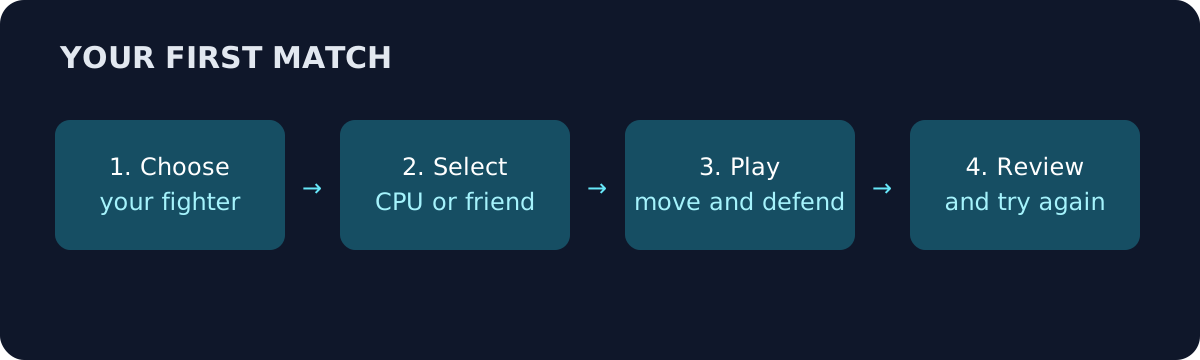
Original guide illustration: the match loop. The game interface may look different.
Your first useful practice routine
Choose Easy and begin with a familiar fighter. In the first round, focus on spacing: walk toward the CPU, stop just outside its reach, and retreat when it approaches. In the next exchange, hold back to defend and use a single punch or kick after the opponent finishes an attack. This routine is a practical suggestion, not a claim that every attack has the same recovery time.
Once that feels comfortable, try a short sequence shown on the game legend, such as punch, punch, kick. Press the inputs deliberately rather than striking every key at once. If nothing comes out, look at the screen and repeat the sequence at a different pace. The legend is more reliable than assuming that a combo from another fighting game will work here.
A full SHAKTI meter opens the super option, but a powerful move is not a substitute for watching your opponent. Try it after creating space or after an opening, and notice what happens if it misses. A failed attempt is useful information for the next round.
Challenge a friend
The game page shows Play with a Friend, a Host a Room control and a field for a room code. Both players should open the game, have one person host, and pass the displayed code to the other person to join. Follow any instructions shown in the current interface. This guide has not independently tested a room or verified cross-device compatibility, so connection behaviour may vary.
- On the selection screen, choose Play with a Friend.
- One player selects Host a Room and shares the code shown on screen.
- The other player enters that code and selects Join. Follow the room's current prompts to choose fighters and start.
The host and join controls are visible on the game page; room creation, joining and an actual match remain untested by this guide. Other reports describe different code lengths, so use the code displayed in your room rather than assuming a fixed length.
For separate host and guest steps and a troubleshooting table, see the multiplayer and friend-room guide.
If joining fails, first check the code character by character and make sure both players are using the current game page. If a room has expired or the host has closed it, make a new one and share the new code. Try a stable connection and avoid assuming that a code from an older session will remain valid. Do not share passwords or personal account information as a substitute for a room code.
Choosing a fighter and stage
The public selection screen lists MitraMan, Yatra Boy, Deedee, Tariff Taau, Dozer Dada, Toll Man, Sutti Babu and Rail Raja, as well as a boss-marked MBAPU tile. Older guides describe smaller rosters, so check what is actually selectable in your version. The characters guide explains how to compare the choices without inventing rankings or biographies.
The stage cards provide different settings. We have not verified a stage-specific advantage or rule, so start with whichever backdrop is easiest for you to read. If the background makes attacks difficult to see, switch stage and compare. Good visibility can matter more to a beginner than an unverified claim about a particular arena.
What to do when the page does not start
Confirm that the address is the game host and that the browser is online. On a phone, rotate into landscape when prompted. If a touch target seems covered, try the page's fullscreen or toolbar options. On a computer, click the game area and check that another application is not capturing the keyboard. Refresh only after accepting that it may interrupt the current match or room.
The public game page provides browser access. It did not link an APK when checked; an unrelated download page should not be assumed to be official. See mobile play and download and APK guidance for a cautious checklist. For the locked boss, read the separate MBAPU guide and verify the unlock condition against your current screen.