The public Sansad Showdown game is available in a browser at FightKaro. When checked on November 7, 2026, the game page did not link an APK download. You can open the browser game without installing a separate package. This is a dated observation about the official page, not proof that no app or package could ever be released elsewhere.
An APK is an Android application package. A website claiming to offer one may be unrelated to the game creator, even if its page uses the same title. This independent guide explains how to use the browser version, what a home-screen shortcut does, and how to assess a future download claim without confusing it with an official announcement.
Play in the browser first
On a computer, open the game page in a modern browser, read the satire notice and press Enter or click when prompted. Choose a fighter, CPU opponent, stage and difficulty using the current selection screen. On a phone, open the same page, rotate into landscape as requested and use the visible touch controls. The how-to-play guide walks through the first match.
Browser play and a downloaded application are different distribution methods. Opening the page loads the web experience; it does not establish that a separate Android package has been published. The page can receive changes without you manually downloading a new installer. It may also depend on a network connection, and we have not verified an offline mode.
If you cannot get past the start screen, check the address, connection and any on-screen instructions. On desktop, click the game area before trying the keys. On mobile, check orientation lock and whether a browser toolbar obscures controls. Reloading may interrupt a match or room, so do not refresh in the middle of a session unless you are ready to restart it.
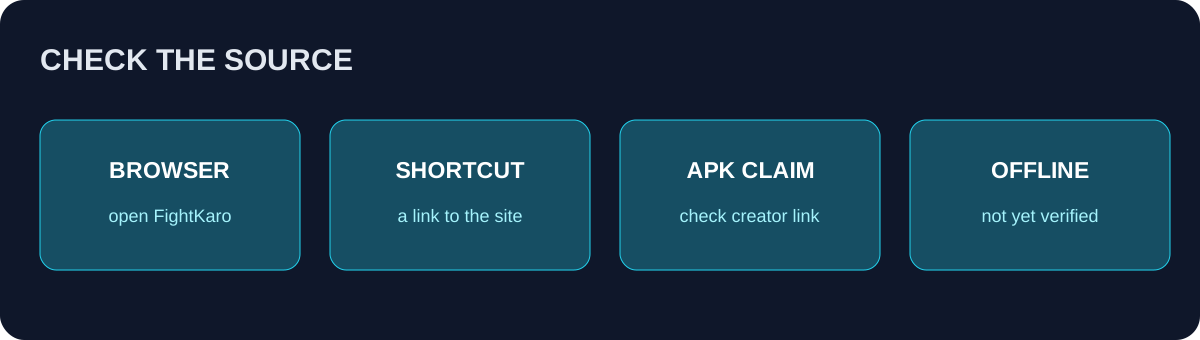
Original decision diagram: begin with the game page and verify a publisher-provided link before trusting a download claim.
What a home-screen icon means
The game page mentions adding it to a phone's home screen for a fullscreen-style experience. The exact menu depends on the browser and operating system. In a supported browser, open the game page, use the browser's share or menu controls, and look for an option to add the page to the home screen. Follow your device's prompts and inspect the resulting icon before using it.
A shortcut is a convenient way to return to a web address. Depending on the browser and the site's configuration, its presentation can resemble an app, but the icon alone does not prove that an APK was installed or that offline play is supported. Test your own setup while online first. We have not confirmed that the game continues working without network access, so do not rely on it for an offline trip.
To remove a shortcut, use the phone's normal home-screen editing controls. Removing a shortcut and uninstalling a separately installed application are different operations. If you are unsure what is installed, consult the device's application settings rather than assuming every icon is a native app.
How to assess an APK or store listing
Start at the game creator's current page and look for a direct link to the proposed download or store listing. Check the destination address carefully before opening it. Compare the developer or publisher identity, the exact game title, the release information and the link's origin. A search result, copied logo or enthusiastic review is not by itself evidence of an official release.
If a site claims that an APK is required while the official browser game still opens, treat the claim cautiously. Do not disable device protections, grant unrelated permissions or enter payment details simply to run the free browser page. If a future official release appears, verify it again from the creator's own current channels; a statement in this dated guide cannot replace a fresh check.
There are similarly named games and independent guide sites. Verify that a listing refers to the satirical fighter titled The Great Kursi Fight and that the creator links to it. A different game using similar words is not necessarily an update or a mobile edition of this one. Avoid interpreting an unofficial version number as an official release announcement.
Common download questions
Do I need an APK to play? The checked FightKaro page provides a browser game and did not require a separate APK to open that page. Your browser and device still need to support the web experience. The game page may change, so check its current instructions.
Is there an official APK? The checked page did not link one on November 7, 2026. We did not verify every app store or every possible distribution channel, so we cannot make a universal claim that an official package does not exist. Look for a current link from the creator before accepting a claim.
Does Add to Home Screen make the game offline? Not necessarily. A shortcut or installed web experience may still require a network connection. We have not tested offline support, and the presence of an icon is not sufficient evidence that assets are cached or friend rooms work without a network.
Can I play on iPhone and Android? The public page supplies mobile instructions, including landscape orientation and touch buttons. That does not establish compatibility with every model or browser. If the game fails to load, update your browser, check the connection and consult the on-screen instructions before looking for an installer.
Can I use a friend room from a phone? The page offers a host and room-code flow, but this guide has not independently tested mobile-to-desktop compatibility. Both players can inspect the current interface and try a fresh room code. See mobile play for practical setup and troubleshooting.
Keep the distinction clear
The browser address is the starting point for this guide, the home-screen option is a convenience, and an APK is a separate package that needs its own publisher verification. Do not assume one implies the others. For the game's controls, see keyboard and touch controls; for its current selection-screen names, see characters. Return to the creator's page whenever a claim about a new platform, package or release seems uncertain.